







Bonus with Subscription!
Parallels Toolbox
More than 40 one-touch productivity tools—clean your drive, take screenshots, download a video, and more—all with one click.
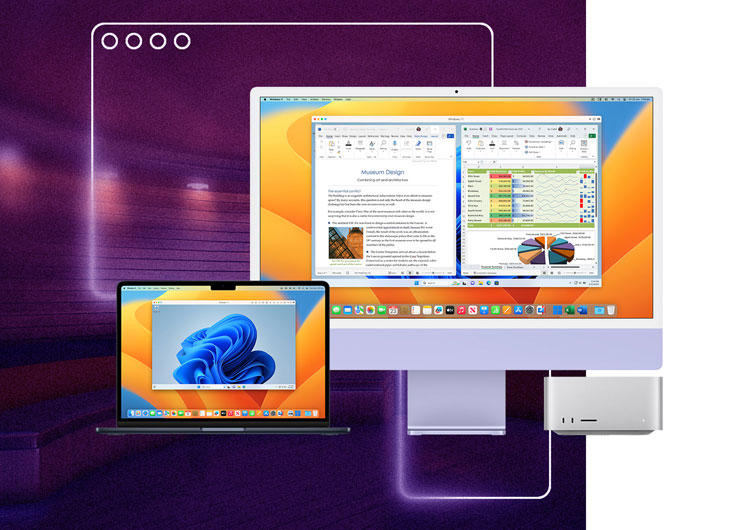
Experience Windows as if it was designed for Mac: use Mac files, keyboard, trackpad, camera & mic, sound, graphics, Touch ID, and many more. If you have an Apple M-series chip, Boot Camp will not work as it requires a Mac with an Intel processor. To install Windows 11 on your M-series Mac, you can use Parallels Desktop for Mac.
| What’s the difference between Parallels Desktop and Boot Camp? | Boot Camp | Parallels Desktop |
|---|---|---|
| Install Microsoft Windows on your Mac | Only Intel Mac (Mac models before 2021) |
|
| Install Microsoft Windows 11 on your Mac | ||
| Download and install Windows in one click | ||
| Run Windows without rebooting your Mac | ||
| Run Windows on your Apple M-series Mac | ||
| Run Windows applications side-by-side with Mac applications | ||
| Easily share files, devices, and other resources between Windows and Mac | ||
| Copy and paste images and text and drag and drop files between Mac and Windows applications | ||
| Swipe between OSes |
| Boot Camp | |
|---|---|
| Install Microsoft Windows on your Mac | |
| Install Microsoft Windows 11 on your Mac | |
| Download and install Windows in one click | |
| Run Windows without rebooting your Mac | |
| Run Windows on your Apple M-series Mac | |
| Run Windows applications side-by-side with Mac applications | |
| Easily share files, devices, and other resources between Windows and Mac | |
| Copy and paste images and text and drag and drop files between Mac and Windows applications | |
| Swipe between OSes | |




Play many classic Windows-exclusive games on your Mac, including Roblox, League of Legends, Minecraft, Half-Life 2, Age of Empires series, Fortnite, Fall Guys, Rocket League and many more.[1]
[1] – supports up to DirectX 11.
Experience hundreds of Windows-only games on a Mac with the same optimal performance as you would on a PC.


Continue using your trusted Windows applications, including perpetual versions of existing software or entertainment and hobby-related apps.

Comfortable using Windows? We've got you covered. Enjoy the best Windows has to offer, fully integrated into your Mac environment.

Streamline your financial tasks with easy access to the most popular accounting software like MYOB, QuickBooks and many more.

Experience the full power of Microsoft Office on Windows with advanced macros, extensive plugin support, and superior compatibility.

Parallels Desktop unlocks your Mac’s capability to run specialized Windows software like Matlab, Ansys, SolidWorks, Altium Designer, and other data analysis and engineering software.

Download and run a variety of ready-to-use Linux distributions to study computer science and software engineering.

Run Articulate 360 to develop e-learning content and create online courses on your Mac.

Parallels Desktop is authorized by Microsoft to run the Arm version of Windows 11 Pro and Enterprise on a Mac with Apple silicon.


Unlock the full power of Microsoft Office 365 on your Mac and take advantage of Windows-only add-ons for Excel and PowerPoint.

Run the full-featured version of any Microsoft app on your Mac, including

Use your preferred Windows-based office suite, including WPS Office, Hancom Office, and others.


Discover the power of Pro Edition to run graphically demanding and resource-intensive applications, high loads, and multiple virtual machines.



Explore advanced features for software development, network testing, and CI/CD automation.
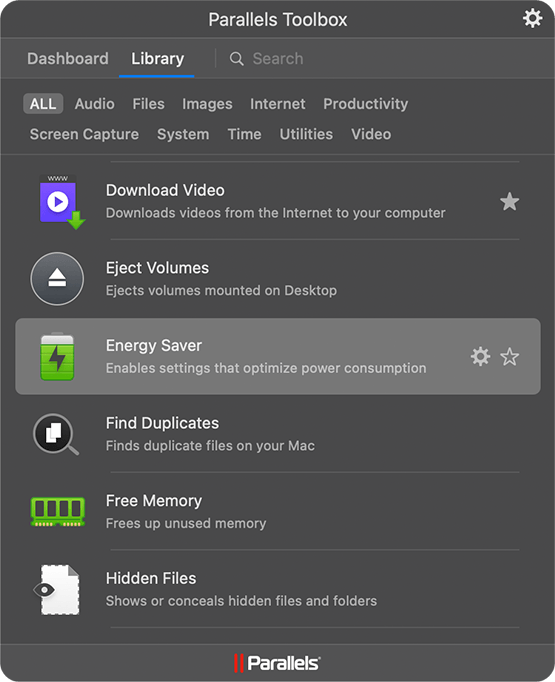
More than 40 one-touch productivity tools—clean your drive, take screenshots, download a video, and more—all with one click.
| Standard | Pro | Business | Enterprise | |
| Best for | Light home use | Power users and developers | Teams and small businesses | IT-managed deployments |
| Core components |
Standard | Pro | Business | Enterprise |
|
Maximum virtual RAM and CPUs*
|
8 GB vRAM, 4 vCPUs |
128 GB vRAM, 32 vCPUs |
128 GB vRAM, 32 vCPUs |
128 GB vRAM, 32 vCPUs |
|
Supports latest versions of macOS, Windows, and Linux
|
Subscription only | |||
|
Authorized by Microsoft and SOC 2-certified
|
||||
|
3D acceleration—DirectX and OpenGL
|
||||
|
Run thousands of Windows apps on your Mac
|
||||
| Advanced capabilities |
Standard | Pro | Business | Enterprise |
|
Run Windows apps with intensive graphics and processing needs
|
||||
|
Command line interface
|
||||
|
Built-in developer tools
|
||||
| System tools |
Standard | Pro | Business | Enterprise |
|
Disk cleanup and memory cleaner
|
||||
|
System and performance monitoring
|
||||
|
Multimedia download and conversion
|
||||
|
Productivity and privacy boosters
|
||||
|
Screen capture and recording
|
||||
| Teams and small business |
Standard | Pro | Business | Enterprise |
|
Centralized administration and license management
|
||||
|
Automation of CI/CD workflows
|
||||
|
Advanced provisioning tools
|
||||
|
Volume licensing
|
||||
|
Jamf and Intune integration for automated deployment and updates
|
||||
| Enterprise |
Standard | Pro | Business | Enterprise |
|
Management portal for policy enforcement and compliance visibility
|
||||
|
Golden image creation and deployment
|
||||
|
Encrypted VMs locked to organizational control
|
||||
|
Granular control of VM settings, network, USB, clipboard, and shared folders
|
||||
|
SSO/SAML with SCIM provisioning and per-user/device licensing
|
||||
Standard |
Pro |
Business |
Enterprise |
|
|
From
|
|
|
Contact sales for pricing |
|
| Buy now | Buy now Try now | Buy now Try now | Contact sales Try now | |
| /yr | ||||
| Upgrade | Upgrade |
| Standard | |
| Best for Light home use | |
| Core components |
|
|
Maximum virtual RAM and CPUs
|
8 GB vRAM, 4 vCPUs |
|
Supports latest versions of macOS, Windows, and Linux
|
Subscription only |
|
Authorized by Microsoft and SOC 2-certified
|
|
|
3D acceleration—DirectX and OpenGL
|
|
|
Run thousands of Windows apps on your Mac
|
|
| Buy now | |
| Pro All the Standard features PLUS: |
|
| Best for Power users and developers | |
| Core components |
|
|
Maximum virtual RAM and CPUs
|
128 GB vRAM, 32 vCPUs |
|
Supports latest versions of macOS, Windows, and Linux
|
|
|
Authorized by Microsoft and SOC 2-certified
|
|
|
3D acceleration—DirectX and OpenGL
|
|
|
Run thousands of Windows apps on your Mac
|
|
| Advanced capabilities |
|
|
Run Windows apps with intensive graphics and processing needs
|
|
|
Command line interface
|
|
|
Built-in developer tools
|
|
| System tools |
|
|
Disk cleanup and memory cleaner
|
|
|
System and performance monitoring
|
|
|
Multimedia download and conversion
|
|
|
Productivity and privacy boosters
|
|
|
Screen capture and recording
|
|
| Buy nowTry now | |
| Business All the Standard and Pro features PLUS: |
|
| Best for Teams and small businesses | |
| Teams and small business |
|
|
Centralized administration and license management
|
|
|
Automation of CI/CD workflows
|
|
|
Advanced provisioning tools
|
|
|
Volume licensing
|
|
|
Jamf and Intune integration for automated deployment and updates
|
|
| Buy nowTry now | |
| Enterprise All the Standard, Pro and Business features PLUS: |
|
| Best for IT-managed deployments | |
| Enterprise |
|
|
Management portal for policy enforcement and compliance visibility
|
|
|
Golden image creation and deployment
|
|
|
Encrypted VMs locked to organizational control
|
|
|
Granular control of VM settings, network, USB, clipboard, and shared folders
|
|
|
SSO/SAML with SCIM provisioning and per-user/device licensing
|
|
| Contact salesTry now | |
We appreciate your interest in Parallels products.
Please check your email for instructions to download and install your trial.
We appreciate your interest in Parallels products.
Please check your email for instructions to download and install your trial.
We appreciate your interest in Parallels products.
Please check your email for instructions to download and install your trial.
We're proud of our Parallels products and we're confident that you'll be satisfied with your purchase. That's why we offer the Parallels 30-Day Money-Back Guarantee. Buy today and if you're not completely satisfied with your purchase within the initial 30 days, Parallels will refund your money based on your original method of payment. For more information on our refund policy, click here.
Please note: Only products purchased directly from www.parallels.com qualify for the Parallels 30-Day Money-Back Guarantee. Purchases made from a retailer or partner must be returned to where you made your purchase and are subject to the return policy of that retailer. Offer excludes renewal transactions.
Check out Parallels Desktop Business Edition.
Parallels offers exclusive discounts for students currently enrolled in a qualified institution or professional educators who are currently employed at a qualified institution. Educational discounts can save users up to 50%. Start by verifying eligibility.
Parallels Desktop Pro Edition offers all the capabilities you already know and love, plus it is packed with extra features, including:
Parallels offers a 30-day money-back guarantee on all initial purchases made on parallels.com. If you purchased from another retailer, please check their return policy.
Microsoft has confirmed that Parallels Desktop for Mac used with Arm versions of Windows 11 Pro and Enterprise editions is an officially compatible solution for customers on Apple silicon Mac computers.
Users will be able to bring their own Windows 11 license keys if they have a key that can be used to activate Windows.
To learn more about any limitations running Windows 11 on Parallels Desktop, please visit https://kb.parallels.com/129497
Parallels Desktop Pro is built for developers, QA testers, IT professionals, and power users who need more control, performance, and flexibility than the standard edition offers. It’s ideal for running multiple virtual machines, testing across operating systems, automating workflows, and handling resource-intensive workloads on Mac, including Apple Silicon systems.
Parallels Desktop Pro includes advanced features for developers and power users, such as support for running multiple VMs simultaneously, enhanced networking options, automation tools, and greater CPU/RAM allocation, that aren’t available in the Standard edition. In contrast, Parallels Desktop Standard is designed for everyday users who want an easy way to run Windows and other operating systems on a Mac without the performance tuning, development workflows, or enterprise-level management features found in Pro.
Yes. Parallels Desktop Pro supports Docker, Kubernetes, and DevOps workflows by giving you the performance, automation, and virtualization flexibility needed for local development and testing. With Pro, you can run and manage containerized environments, integrate with development tools, and build, test, or debug applications across multiple operating systems directly on your Mac. This makes it a strong choice for developers and engineers working with modern DevOps toolchains.
Yes, with Parallels Desktop Pro you can run multiple virtual machines simultaneously on your Mac, allocating more CPU and memory to each as needed. This makes it easier to test across different operating systems or configurations in parallel without constantly shutting down and restarting individual VMs.
Yes, you can upgrade from Parallels Desktop Standard to Parallels Desktop Pro by purchasing a Pro license and entering the new activation key in the app. Once upgraded, you’ll immediately unlock the additional performance, networking, and development features that Pro offers without needing to reinstall anything.
Parallels Desktop Pro is primarily offered as a subscription, which includes ongoing updates and access to Pro-only features for the duration of your plan. A one-time perpetual license is generally not available for the Pro edition, so if you want to keep using Pro and receive updates year after year, you’ll need to maintain an active subscription.
For the most up-to-date system requirements, please visit our Knowledge Base article.
Parallels Desktop free trial
You’re on a mobile device. We will send you the download link to your email address so you can download Parallels Desktop directly to your computer.
You're close!
Check your email on your computer to download your free trial.
Join our mailing list to receive 15% off your purchase* and stay informed about special deals, the latest updates, and more from Parallels Desktop.
Thank You!
Check your email for special deals, the latest updates, and more from Parallels Desktop.


