





There is no need to install local printer drivers on the Microsoft Remote Desktop Session Host (RDSH) when using Parallels RAS Universal Printing. The universal printer driver will receive any printing job, compress it, and send it back to the local device.
Remote Desktop Printing with Universal Printing
Ready out-of-the-box, remote desktop printing with Parallels® Remote Application Server (RAS) Universal Printing allows users to print directly to their local printers without any extra configurations.
With Microsoft RDS Easy Print, the delayed response from click to print can take up to a few minutes because it sends the printing job directly through the client without compression. Parallels RAS Universal Printing uses file-compression technology to increase speed and performance, enabling instant printing.
Parallels RAS Universal Printing uses plug-and-play technology, requiring no configuration. It's ready to use and fully functional for any user. Users can work on any network printer connected to their device. Parallels RAS also fully supports RDP USB redirection.
Parallels RAS Universal Printing works when users are connected to Microsoft RDS—no need for any additional network configuration. Increase printing performance and response time when using local printers with server-based desktops or virtual applications.
Parallels RAS enables native PDF printing using the DynaPDF library. When the user is connected to a Windows client, the solution automatically enables "save as PDF", even if the PDF driver is not installed.
IT administrators can successfully integrate printing into almost every deployment scenario. By choosing the most appropriate printing configuration for their organization, IT administrators can significantly improve and simplify the user experience when it comes to printing.
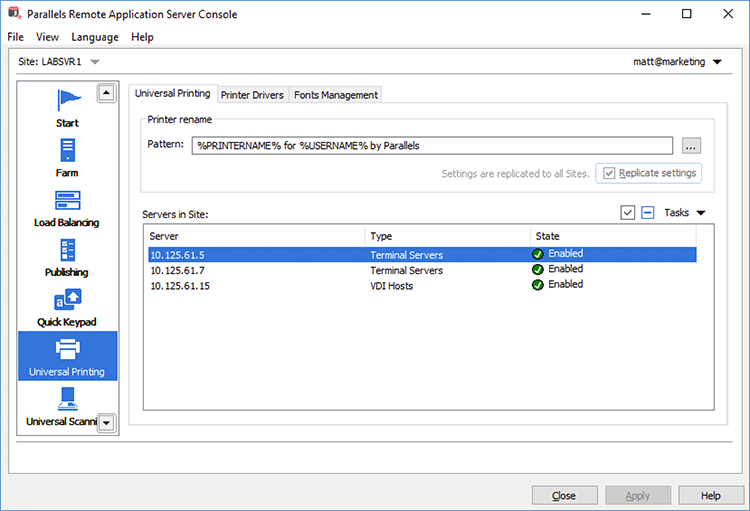
Universal Printing
Parallels RAS Universal Printing sets printer defaults on the server-side according to printer settings on a mobile device or local computer. To be universal, Parallels RAS substitutes the native printer preferences dialog with a custom one, which contains a common set of configuration parameters such as page layout, paper size, collate, duplex, color, paper tray output, and print quality.